
Theme options
To access the Theme options, navigate to WP admin -> Theme options.
Options are divided into the following sections:
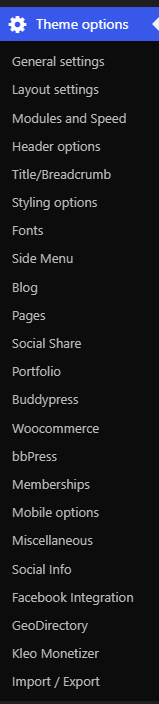
- General settings – Logo, favicons, analytics code, Quick CSS code
- Layout settings – Boxed/Wide layout, Sidebar/No sidebar, etc
- Modules and Speed – turn on/off js/css minification, disable certain shortcodes.
- Header options – Different options for you to choose from
- Title/breadcrumb – Breadcrumbs and title settings On/Off
- Styling options – Backgrounds, colors, for header, main section,alternate section, socket and footer
- Fonts – Set the fonts you want to use in the site
- Sidemenu – Left, Right or overlay mobile menu.
- Blog – Layout options for blog pages
- Pages – enable comments,media, etc
- Social Share – manage the sharing for social platforms
- Portfolio – settings for portfolio view, title, img sizes,etc
- Buddypress – Buddypress related settings
- Woocommerce – Layout settings for woocommerce pages
- bbPress: bbPress Pages Layout settings
- Memberships – Available only when Paid Memberships Pro is installed. Restrict access to Buddypress related components
- Mobile Options- mobile app capable meta tag, browser theme color
- Miscellaneous, turn off animations, manage login redirect, disable magnific pop-up,development mode
- Social info – Set up your Social profiles
- Facebook Integration – Facebook APP ID and app secret for Facebook login integration.
- Geodirectory: Geodirectory pages layout and menu setup
- Kleo Monetizer: Provides Banner zones / Ad zones where you cna add your add codes for display in the site
- Import/Export – save or import the theme settings.
