
After you install and activate KLEO, you will get a notification message in your WordPress admin telling you about the required and recommended plugins.

Just click those links to install the plugins you need.
Alternatively, navigate to the Appearance > Install Plugins section within the WordPress dashboard to install both the required and recommended plugins:
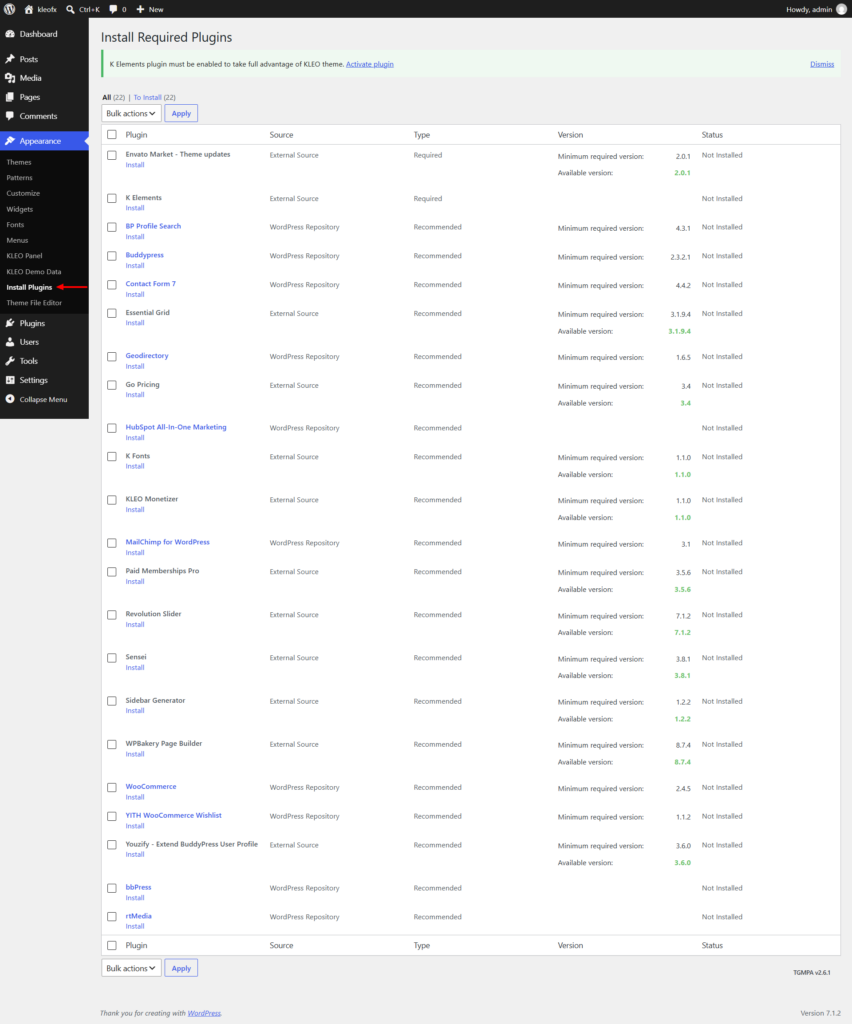
Required plugins to be installed and activated
– K-elements – contains all of our theme features like shortcodes and shortcode generator
– WPBakery (former Visual composer) – Add shortcode elements to your page with a drag-and-drop interface
– Envato Market – Theme updates – Facilitates one-click automatic updates for the theme.
Recommended plugins to install
You do not have to use all the plugins that KLEO recommend. Use just what you need and activate the plugins that add the functionality you want.
– Revolution Slider – create awesome sliders like the one in our demo homepage
– BuddyPress – Social network in a box. Transform your site into a social platform
– bbPress – adds forums to your site
– WooCommerce – transform your site into a full-featured shop and start selling right away
– YITH WooCommerce Wishlist – adds the ability to add products to Wishlist
– rtMedia – adds nice media galleries to your BuddyPress install
– Paid Memberships Pro – adds membership features to your site so you can start charging your members
– Contact form 7 – Create contact forms for your site
– BP Profile Search – Create custom search forms using profile fields
– Essential Grid – Show off images in custom grid layouts
– Geodirectory – Enables you to add listings to your site and allows visitors to find listings using proximity filters
– Go Pricing – Create pricing tables for your site
– HubSpot All-In-One Marketing – Connects your WordPress website directly to your HubSpot CRM account to capture leads, manage contacts, and run marketing campaigns
– K Fonts – Easily manage custom typography for your site
– KLEO Monetizer – Enables you to add ad codes to your site
– MailChimp for WordPress – Enables you to grow your email list in Mailchimp
– Sensei – Enables you to create and sell online courses on your site
– Sidebar Generator – Enables you to create unlimited custom sidebars on your site
– Youzify – Extend BuddyPress User Profile – Enables you to upgrade standard BuddyPress profiles with social walls, custom widgets, and advanced member directories on your site.
