bbPress is forum software from the creators of WordPress. Easily setup discussion forums inside your WordPress.org powered site.
1. Installing the plugin
In order to install the bbPress plugin, you will need to navigate to the Appearance > Install Plugins section within the WordPress dashboard, and click on the install link next to the plugin.
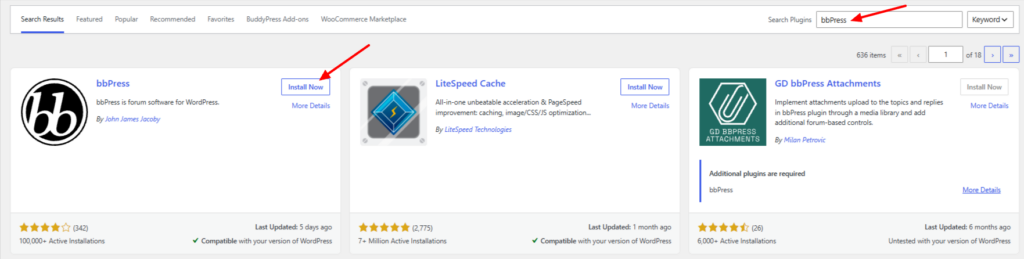
Alternatively, go to WP Admin > Plugins > Add new, and search for the bbPress plugin. Upon finding the plugin in the search results, proceed to install and activate it.
2. Setting up the forums
Go into WP Admin > Forums > Add new
Add a forum and name it whatever you want, but you need at least one to get the forum page going (you can always delete it later).
Now go into the WP Admin> Topics and create a new topic. Again you can trash this later, but you’ll want to see what one looks like.
Okay, so now we have bbPress with one forum and one topic, but we’ll need to show it somewhere, so go to step 3 below.
3. Creating a forum page
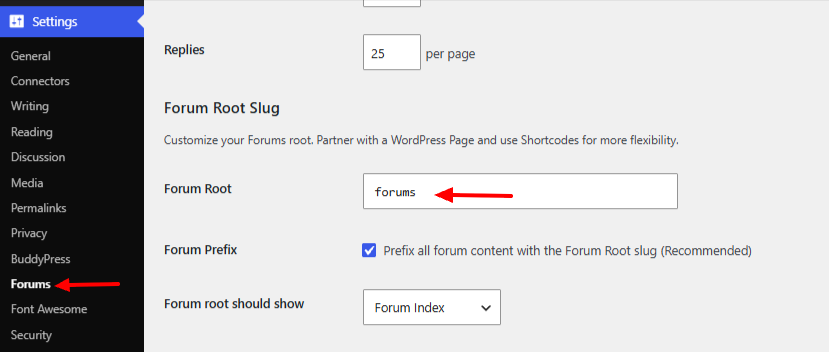
In WP Admin > Settings > Forums look for what is set in the forum root under the forum root slug heading. The default is ‘forums’ but you can set this to anything.