• Dashboard
    • Submit Ticket
    • Licenses
    • Login
  • Our Products
    • BuddyBuilder
    • Kleo
    • Typer
    • Seeko
    • SweetDate
    • BuddyApp
  • Services
    • VIP Support
    • WordPress Theme Installation Service
  1. Home
  2. General
  3. Enabling BuddyPress Groups

Enabling BuddyPress Groups

When first installing BuddyPress, Groups module is not enabled by default and you need to activate it.

Enable Groups

Follow these easy steps to activate the Groups component:

  1. Go to WP Admin> Settings > BuddyPress > Components.
  2. Make sure to check User Groups and click Save.
  3. Check your Groups URL in the Settings > BuddyPress > URLs section
  4. From your Groups URL, you are able to create groups as an admin upon viewing the URL and clicking the “Create a Group” link

Allow users to create groups

You can also allow users to create groups by enabling the setting in WP admin > Settings > BuddyPress > Options > Enable group creation for all users
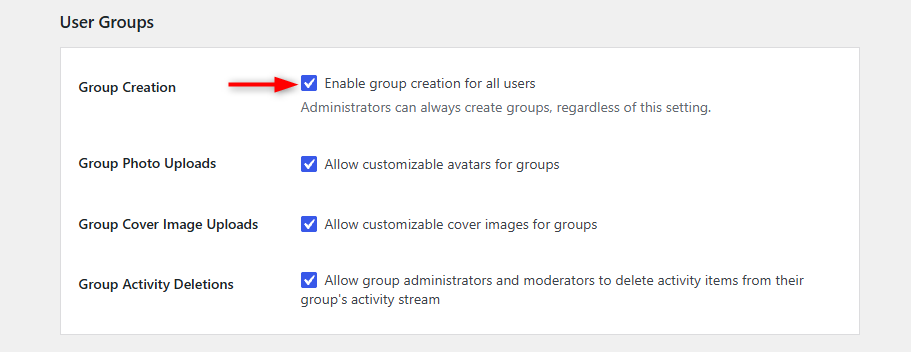
Users are now able to create their own groups on your site.

Populate with dummy groups

Sometimes it is best to have some content and not to creating groups by hand can be time consuming.

Luckily there is an awesome plugin for that and allows you to generate groups, members and activity content.

Check it out: wordpress.org/plugins/bp-default-data

Blazing Fast Site Hosting & Maintenance

  • Theme Requirements
  • WordPress Installation
  • Theme Automatic Updates
  • BuddyPress overview
  • Elementor overview
  • STAX Header Builder overview
  • bbPress overview
  • Membership overview
  • rtMedia overview
  • WP Bakery Page Builder
  • Enabling BuddyPress Groups
  • Paid Memberships Pro
  • Bundled plugins and activation codes
  • Add link to element or button in Slider Revolution
  • Introduction to the child theme
  • Overriding a file with the child theme
  • Saving Customizer Settings(Import/Export)
  • Build a menu with Stax
  • Find Theme Purchase Code
  • Translate theme with Loco Translate
  • Multilingual setup using WPML plugin
  • Show profile fields in the members directory
  • My site is slow. How to speed up my website?
  • How to add a Populated Country List XPROFILE
  • Troubleshooting an issue
  • Admin bar only for admins
  • Error 404 - Page not found
  • Show profile fields in the members directory
  • Show profile fields in the profile header
BuddyBuilder is out. Total freedom to build online communities
SeventhQueen  - 2021 - Privacy Policy

Welcome to SeventhQueen Portal


Lost your password?

Don't have an account? Register now!

Forgot your details?


Wait, I remember now. Log In

Register your account

Sign up with Email
I have an account. Log In

Insert/edit link

Enter the destination URL

Or link to existing content

    No search term specified. Showing recent items. Search or use up and down arrow keys to select an item.