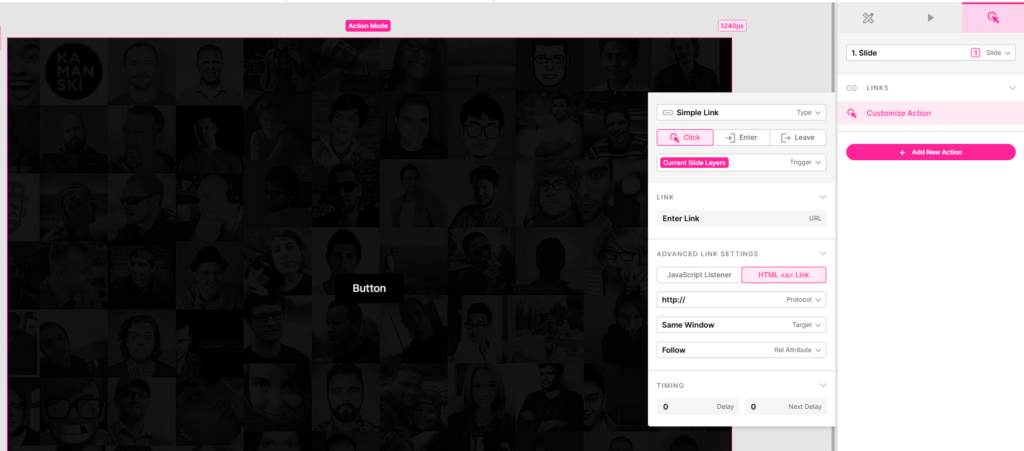
In Slider Revolution, you can easily add a link action to any element in a slide, also called layer.
Add a Button or Text layer, depending on your needs
If you already have an element on the page that you want to link just skip to next step.
Links can be added to any individual Layer

Adding the Click Action
Next, select the Layer and click the “Actions” menu item, click on the “Add New Action” button, and from the popup rendered, select the Simple link option.
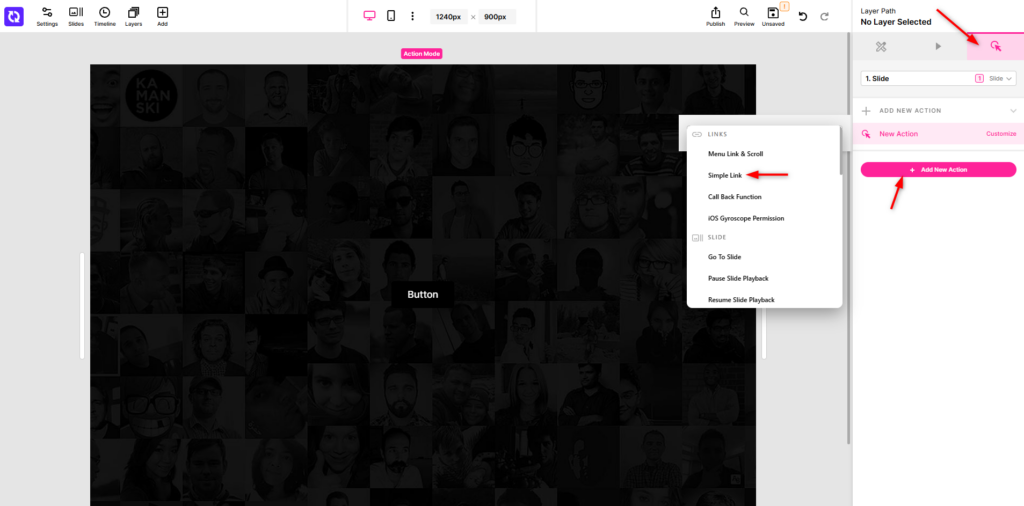
Add Your URL and settings
After clicking the Simple link option you will get a new window with the options for the link:
Link URL: The actual link you want to go when clicking that element
Link Target: Open the link in same window or in a new window
Link Protocol: Sets the web address protocol used for the link’s URL.
Follow: Add an optional rel=”nofollow” attribute to the link.
Delay: Add an optional delay that occurs after the event fires before the link is followed. A value of 0 follows it immediately.
Next Delay: Sets a pause measured from this action before the next action on the same trigger runs.