1. Home
  2. Sweetdate
  3. Plugins

Chapter: Plugins

Plugins overview and settings.

Add link to element or button in Slider Revolution

In Slider Revolution, you can easily add a link action to any element in a slide, also called layer. Add a Button or Text layer, depending on your needs If you already have an element on the page that you want to link just skip to next step. Links can be added to any individual Layer Adding the Click Action […]

GEO My WP + Sweetdate: Add a map search and location

Sweetdate and GEO My WP have a special extension that allows you to add a map and a search by location to your community. To get started you need: GEO MY WP plugin ( it’s free ) Found here: https://wordpress.org/plugins/geo-my-wp/ After the plugin is installed, go to GEO My WP – Extensions     Activate Members Locator and Sweetdate extensions Go […]

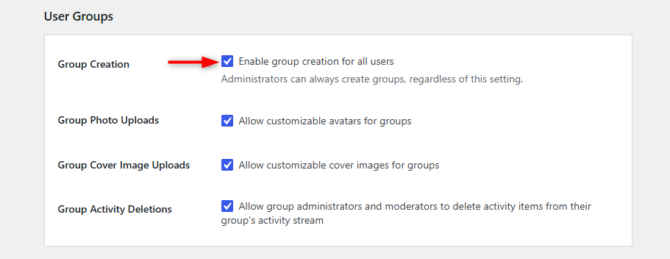
Enabling BuddyPress Groups

When first installing BuddyPress, Groups module is not enabled by default and you need to activate it. Enable Groups Follow these easy steps to activate the Groups component: Go to WP Admin> Settings > BuddyPress > Components. Make sure to check User Groups and click Save. Check your Groups URL in the Settings > BuddyPress > URLs section From your Groups URL, […]

Woocommerce

Sweetdate likes and supports Woocommerce. Automatic install After activating the theme, a notice will appear letting you know that you can install Woocommerce. Manual installation The manual installation involves downloading the plugin and uploading it to your webserver via your favourite FTP application. Download the plugin to your computer from http://wordpress.org/extend/plugins/woocommerce/ Unzip the file. Using an FTP program, or your […]

Memberships

Since V.2.0 we added the option to add Memberships using a modified version of awesome PMPRO plugin: http://www.paidmembershipspro.com Before you get started… be sure to spend some time thinking about what membership levels you want for your site. It’s easiest to set up Paid Memberships Pro when you have this very clear ahead of time. What will members have access to? […]

Revolution Slider plugin

We have created some demo sliders so you have a starting point. You can see the sliders in action at our demo site: http://seventhqueen.com/demo/sweetdatewp To import the slider: – Go to WordPress Admin -> Revolution Slider -> Import Slider. – Browse to the Demo content folder, located in the package downloaded, and go to revolution_slider. – Choose one of the […]

Extended features

We are constantly adding support for different plugins so you can easily extend Sweetdate. Supported plugins: Simple Ads Manager –  is easy to use plugin providing a flexible logic of displaying advertisements. Features Flexible logic of advertisements rotation based on defined weight of each advertisement in group (Ads Place) Custom default ad for each Ads Place Codes of Google DoubleClick for […]

Restrict website for non logged in members

To create a website that has a restriction for non logged in members, lets say you want to hide the blog or other pages. If you are not planning to use Paid Memberships Pro because you are not creating a memberships page. Then try Simple Members Only “Simple Members Only” is a simple way to make your whole website only viewable […]

Paid Memberships Pro

We added the option to add Memberships using the awesome Paid Memberships PRO plugin: here. To install it you can do it from the Admin notification that should recommend you to install it or by going to WP admin – Plugins – Add and by doing a search for “Paid Memberships PRO” Before you get started… be sure to spend some […]

rtMedia overview

rtMedia – Allow your users to upload media files from their profile. Formerly known as Buddypress Media brings exciting media features to your WordPress site Features Display media on WordPress author pages (eg:http://example.com/author/admin/media/) A BuddyPress integration BuddyPress Integration Adds media tab to BuddyPress Profiles and Groups. Attach media to activity status updates. Create activity on uploads and sync comments on […]

bbPress overview

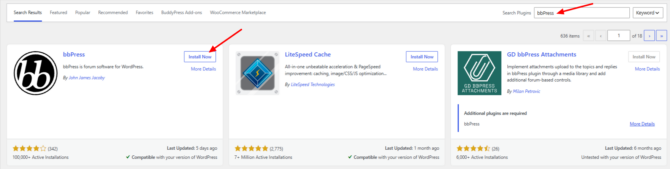
bbPress is forum software from the creators of WordPress. Easily setup discussion forums inside your WordPress.org powered site. 1. Installing the plugin In order to install the bbPress plugin, you will need to navigate to the Appearance > Install Plugins section within the WordPress dashboard, and click on the install link next to the plugin. Alternatively, go to WP Admin  […]

Membership overview

We added the option to add Memberships using awesome Paid Memberships PRO plugin: http://www.paidmembershipspro.com The plugin is FREE and it is integrated in our theme. You can purchase a license code from the plugin official site to enable access to VIP support and add-ons. To install it, you can do it from the Admin notification that should recommend you to install […]